MisterMR MAP Creator
🗺️ MisterMR MAP Creator
📖 Complete User Manual — v1.0
🚀 Getting Started
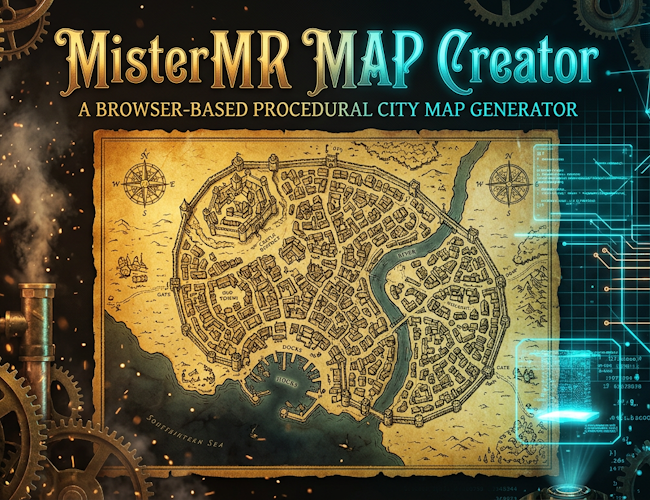
Welcome, cartographer! 🎉 MisterMR MAP Creator lets you sketch a rough map layout and magically ✨ transform it into a detailed, top-down city map — complete with buildings 🏠, roads 🛤️, rivers 🌊, districts 🏘️, walls 🏰, and more!
⚡ Quick Start (30 seconds!)
- 🏗️ Click New City in the header — a random city is generated instantly!
- 🎨 Tweak colors from the bottom Colors bar.
- 📤 Hit Export → choose PNG, SVG, or JSON.
- 🎊 Done! You've got a beautiful map.
🖌️ Custom Map (Full Workflow)
- 🌊 Select the Sea brush and paint ocean areas on the 32×32 sketch canvas.
- 🟫 Switch to Ground to define landmass.
- ◎ Place the City marker — this is where your city will grow.
- 〰️ Optionally paint a River flowing through the land.
- ⚙️ Adjust City Size (1–100) and Tile Detail (80–1024 Voronoi seeds).
- ✨ Press Generate to create the final map!
🎮 Interface Overview
🔝 Header Bar
| Button | What it does |
|---|---|
| 🏗️ New City | Generates a completely random city sketch + map in one click 🎲 |
| 💾 Save | Saves the current project to browser storage (with thumbnail preview!) 📸 |
| 📂 Load | Opens a modal listing all your saved cities — pick one to restore 🔄 |
| 📥 Import | Loads a project from a .json file on your computer 💻 |
| 📤 Export ▼ | Downloads the map as PNG 🖼️, SVG ✏️, or JSON 📄 |
📐 Left Sidebar
| Control | Description |
|---|---|
| 🏛️ City Name | Type a name or keep the random one — it appears as the map title ✍️ |
| 🖼️ Sketch Canvas | 32×32 grid — click or drag to paint 🎨 |
| 🔵 Brush Size | 1–5 cells wide — bigger brush for faster painting 🖌️ |
| 🌊🟫◎〰️ Tools | Sea, Ground, City, River — select your brush type 🔧 |
| 🧹 Clean | Wipes the entire sketch (asks for confirmation!) ⚠️ |
| 🎲 Random | Generates a random sketch with coastline, river, and city placement 🌍 |
| 🏙️ City Size | Slider 1–100 — controls how large the city sprawls 📏 |
| 📐 Tile Detail | 80–1024 seeds — more seeds = finer detail (slower generation) 🔍 |
| ✨ Generate | The magic button! Transforms sketch → detailed map 🪄 |
🎨 Color Bar (Bottom)
Click Show / Hide to reveal 8 color pickers:
- 🟫 Ground — land color
- ⛰️ Ground High — elevated terrain
- 🌊 Sea — water bodies
- 🏙️ City — urban fill
- 💧 River — river and stream color
- 🛤️ Road — street color
- 🏠 Building — building fill
- 🏘️ District — district outlines
🎲 Hit Randomize for a surprise palette — the map regenerates automatically! 🌈
🗺️ Map Generation — How It Works
Under the hood, the generator uses a multi-stage pipeline 🔧⚙️:
- 🔷 Voronoi Tessellation — Random seed points are placed and relaxed (Lloyd's algorithm) using d3-delaunay to create organic, natural-looking cells.
- 🌍 Zoning — Each cell is classified as sea 🌊, river 💧, city 🏙️, or countryside 🟫 based on your sketch.
- 🛤️ Roads — Main roads radiate from city gates to the center; side streets fill in the grid.
- 🏠 Buildings — City cells get building plots with footprints and hip-roof style rooftops.
- 🏘️ Districts — City cells are grouped into named districts (randomly chosen from 400+ names!).
- 🏰 Details — City walls, a citadel, the river path, a scale bar 📏, and a compass 🧭 are overlaid.
💡 Tip: Higher Tile Detail values produce more intricate maps but take longer to generate. Start with 180–300 for a nice balance! ⚖️
💾 Saving & Loading
🗄️ Browser Storage
Your work is auto-saved to localStorage every time you make a change 🔄. Additionally:
- 💾 Save creates a named snapshot with a thumbnail preview 📸
- 📂 Load shows all saved cities in a visual list — click to restore 🖱️
⚠️ Warning: Browser storage is tied to your browser and computer. Clearing browser data will erase saves! Use Export JSON for backups 📦
📁 File Import / Export
- 📤 Export JSON — saves the full project state (sketch, colors, settings, generated map) as a
.jsonfile. - 📥 Import — restores a project from a
.jsonfile. - 🖼️ Export PNG — downloads the generated map as a high-quality raster image.
- ✏️ Export SVG — downloads as scalable vector graphics (perfect for editing in Inkscape/Illustrator!) 🎨
🎯 Tips & Tricks
- 🎲 Spam New City to quickly browse random cities until one catches your eye! 👀
- 🖌️ Use a large brush (size 4–5) to rough out coastlines fast, then refine with size 1 🎨
- ◎ Place the city marker near the coast or a river for realistic positioning 🌊🏙️
- 🔍 Crank Tile Detail to 800+ for incredibly detailed maps (may take a few seconds ⏳)
- 🌈 Randomize Colors often produces surprisingly beautiful palettes — save the ones you love! 💎
- 📤 Export as SVG for crisp prints at any size — perfect for tabletop RPGs! 🎲🐉
⌨️ Keyboard & Mouse
| Action | How |
|---|---|
| Paint on sketch | 🖱️ Click or drag on the canvas |
| Switch tools | 🖱️ Click the tool buttons (🌊🟫◎〰️) |
| Navigate saved cities | 🖱️ Click items in the Load modal |
| Close modals | 🖱️ Click backdrop or ✕ button |
❓ FAQ
🤔 Why is my map blank after generating?
Make sure you've placed the City marker (◎) on the sketch! Without it, the generator doesn't know where to build 🏗️
🤔 Can I use the maps commercially?
Yes! 🎉 Maps generated by MisterMR MAP Creator are yours to use however you like — personal projects, commercial games, published adventures, prints, you name it! 🚀
🤔 The generation takes too long!
Lower the Tile Detail slider. Values around 150–250 generate in under a second on most machines ⚡
🤔 How do I make an island?
Paint the entire sketch as Sea 🌊, then paint a blob of Ground 🟫 in the middle, and place the city on it! 🏝️
🗺️ MisterMR MAP Creator — Made with ⚙️ gears, ✨ magic, and ❤️ passion
© 2026 MisterMR
Development log
- 🗺️ MisterMR MAP Creator — Now Available! 🎉🔥21 hours ago
Leave a comment
Log in with itch.io to leave a comment.