MR 2D Move
📚 MR 2D Move — Manual
Mesh-based 2D image warping right in your browser ✨ No install.
🎯 Objective
🔗 Pin an image onto a movable dot grid 📍 Key different poses 🎞️ Let the timeline blend or freeze motion 🎉 Export previews as PNG sequences or GIF.
🕹️ Controls
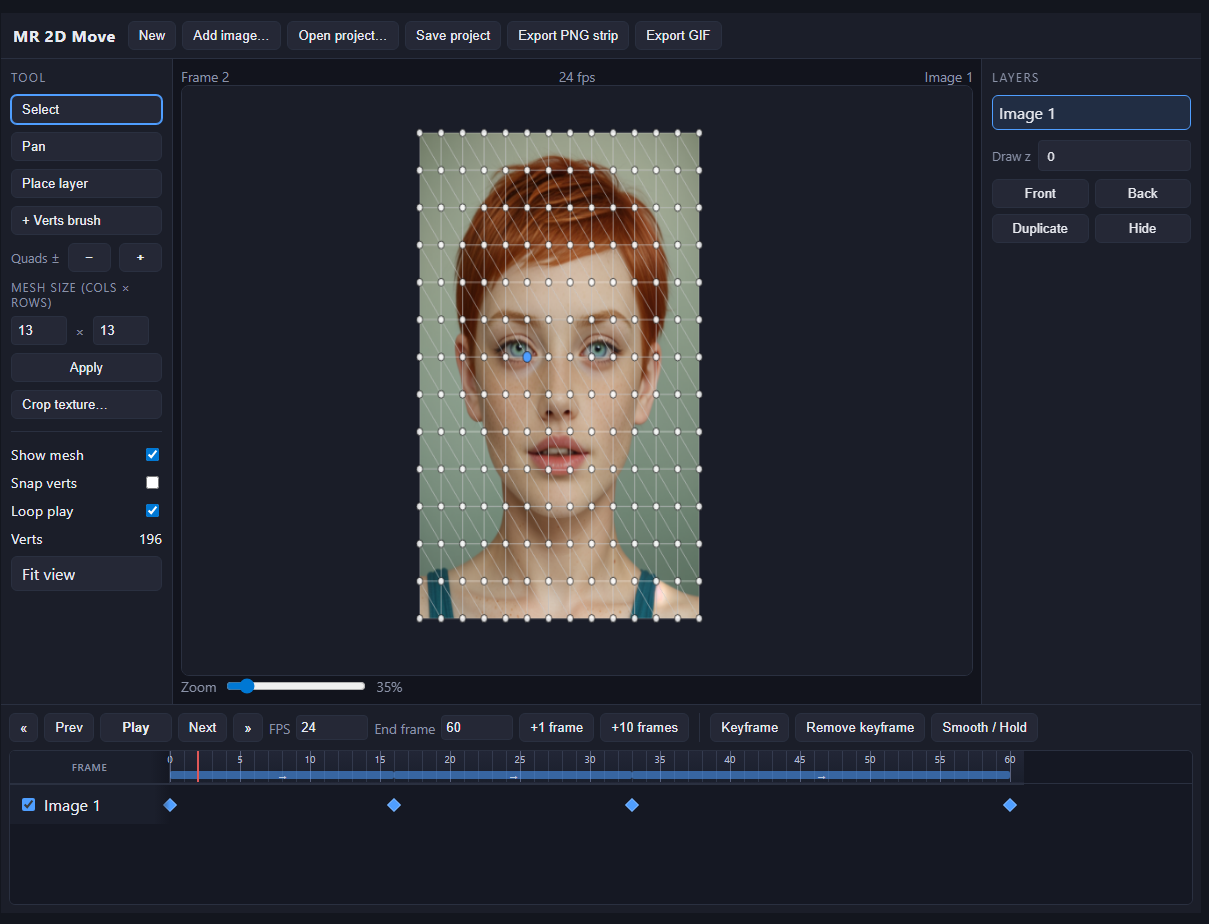
- 🖱️ Select tool — Left click a dot to select; Shift adds more; drag selected dots to warp the image.
- 📦 Marquee — Drag on empty sky to box-select many dots at once.
- 🧭 Pan tool — Drag the background (moves whole view). Or hold Space 🚀 Or Alt + drag 🔹 Or middle-mouse.
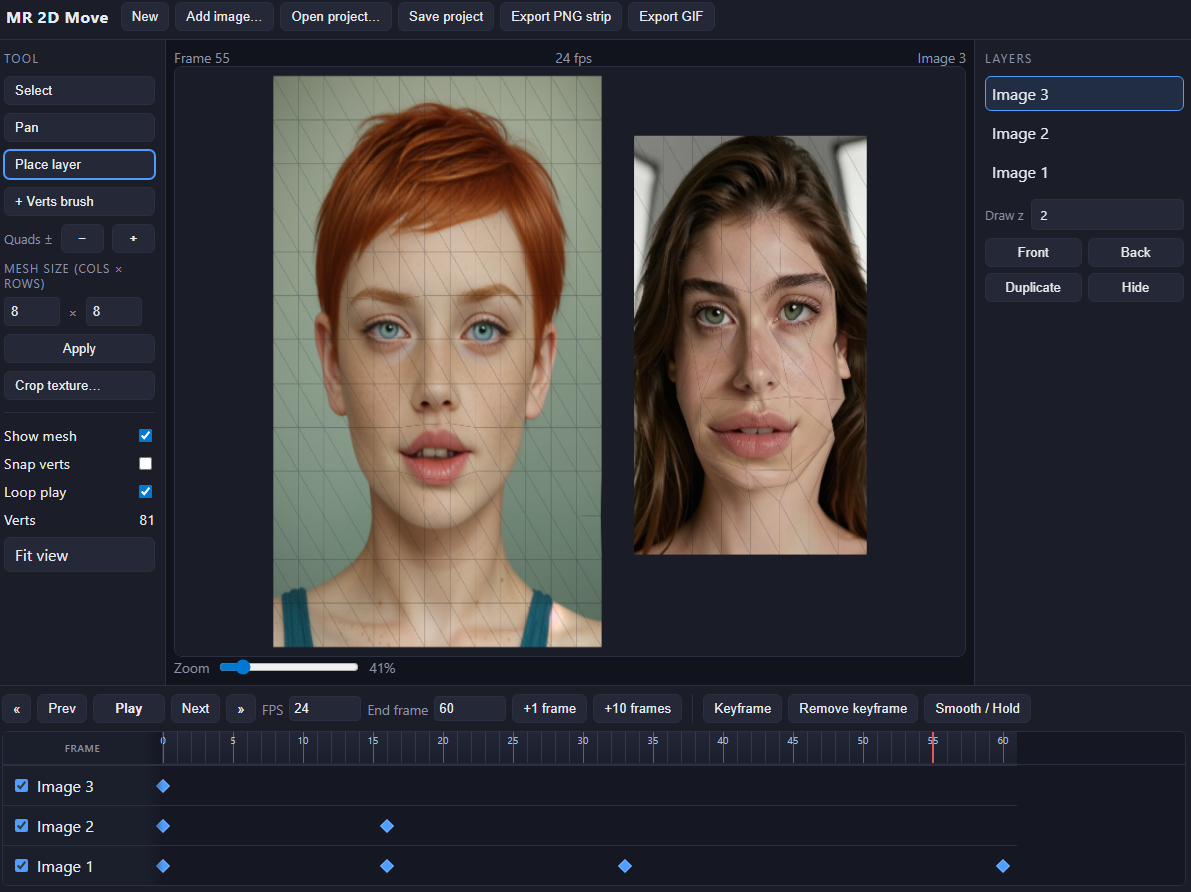
- 📌 Place layer — Drag on the canvas to slide the active layer in the scene without editing vertices 🔀 Shortcut L.
- 🔍 Alt + wheel — Zoom anchored under your cursor 📏 Slider bottom-right zooms globally.
- 📐 Quads ± — + / − add or remove one subdivision on both axes (max 64×64 quads).
- 📊 Mesh size — Set exact column and row counts next to Quads ±, then Apply to resample the grid (warps follow the current pose).
- ✂️ Crop texture… — replace the active bitmap with a rectangular region; deformations stay aligned via resampling.
- 🖼️ Add image… — Each file opens a crop dialog over the app; drag on the preview or use numbers, then Import. Cancel all imports aborts the whole batch.
- ⌨️ V Select · L Place layer.
- 📱 Touch — Prefer two-finger pan on trackpads mimicking scroll (Alt+zoom unavailable on plain touch).
🎬 Timeline
- 📐 The Frame gutter lines up layer names — frame numbers and ticks start only in the striped area so nothing sits under labels.
- 🪜 Draw z (right panel) chooses stack order — higher numbers paint on top 📌 Front / Back nudge the active layer vs its neighbor in that order.
- ➕ Use +1 frame / +10 frames next to FPS to lengthen the timeline, or edit End frame ✏️
- 📌 Beside playback: Keyframe saves the pose at the playhead, Remove keyframe clears it, Smooth / Hold toggles blend vs freeze toward the next key (needs ≥2 keys for the segment toggle) 🔒
- 🖱️ Click the ruler strip to jump frames (same as clicking on a layer track).
- 💎 Diamonds mark keyframes per layer — click to jump.
- 🎨 Blue band + → = smooth blend between keys.
- 🟠 Orange band + ⤍ = hold (frozen pose) until the next key 🧊
- ▶️ Play / Pause respects FPS + end frame; loop optional 🔄
💾 Files & Export
- 🆕 New — Shows a confirmation strip at the top (no browser pop-ups). Erase all clears layers; Keep project dismisses it.
- 📤 Save project downloads JSON with embedded PNGs — keep it 💼
- 📥 Open project reloads offline.
- 🗄️ Quiet autosnap to IndexedDB restores last draft when you revisit (same browser).
- 🖼️ Export PNG strip prompts one numbered PNG per frame (browser might ask many downloads ⚠).
- 🌀 Export GIF quantizes colours (216 web palette + transparency) — great for quick shares 🎁
💡 Tips & Tricks
- ✅ Start with the default 8×8 grid — only add density where detail matters.
- ✅ Store a key at frame 0 before wild edits so you can always return.
- ✅ Use Hold segments for snappy smear frames or pauses.
- ✅ Large JSON? Images dominate size — trim source art before import.
❓ FAQ
Q: How do I add more frames?
A: Bump End frame or tap +1 frame / +10 frames — that grows the playable range 📏 A keyframe saves a pose; it’s not an extra blank frame unless you’ve extended the timeline first.
Q: One dot moved but nothing animates?
A: Add distinct keyframes on different frames 📌 Then press Play ▶️
Development log
- 🎮 MR 2D Move17 hours ago
Leave a comment
Log in with itch.io to leave a comment.