MR Commodore 64 BASIC Simulator
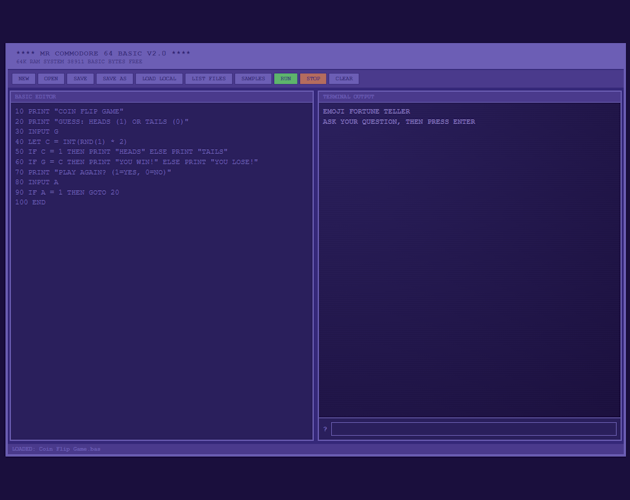
COMMODORE 64 BASIC SIMULATOR
About
Relive the golden age of home computing! This is a fully functional Commodore 64 BASIC V2.0 interpreter that runs entirely in your web browser. Write, run, and save BASIC programs just like you did in the 1980s, but with modern convenience.
--- There are some issue to create game, I am working on it--
Features
- Complete BASIC V2.0 Implementation - All standard commands and functions
- Dual View Modes - Switch between text terminal and game canvas
- 40+ Sample Programs - Games, demos, and educational examples
- File Management - Save/load programs to localStorage or download files
- Game Engine - Create interactive games with keyboard controls
- Authentic C64 Experience - Classic blue-on-blue color scheme
- No Installation Required - Runs directly in your browser
- Offline Capable - Works without internet connection
Perfect For
- Learning programming basics with a classic language
- Nostalgic computing enthusiasts
- Teaching programming concepts
- Creating retro-style games and programs
- Experiencing computing history
Quick Start
20 GOTO 10
Type your program in the editor, click RUN, and watch it execute!
Sample Programs Included
Classic Games: Pong, Tetris, Breakout, Space Invaders, Pinball
Interactive Games: Number Guessing, Rock Paper Scissors, Dice Roll, Memory Games
Emoji Programs: Tic Tac Toe, Card Game, Slot Machine, Fortune Teller
Educational: Math demos, string functions, array examples, subroutines
Supported Commands
Control: GOTO, GOSUB/RETURN, IF/THEN, FOR/NEXT, END, STOP
I/O: PRINT, INPUT
Data: DATA/READ, RESTORE, DIM, LET
Functions: ABS, INT, RND, SQR, SIN, COS, TAN, LEN, STR$, CHR$, MID$, LEFT$, RIGHT$, and more
Special: MODE (switch between text and game views)
System Requirements
- Modern web browser (Chrome, Firefox, Safari, Edge)
- JavaScript enabled
- No additional software needed!
How to Use
- Open the simulator in your browser
- Write BASIC code in the editor (use line numbers like 10, 20, 30...)
- Click RUN to execute
- Use SAMPLES to browse example programs
- Save your programs with SAVE AS
Technical Details
This is a pure JavaScript implementation with no dependencies. All processing happens client-side in your browser. Programs are saved to browser localStorage or can be downloaded as .bas files.
Tips
- Use
MODE "GAME"for interactive games - Use
MODE "TEXT"for text-based programs - Browse samples to learn programming techniques
- Save your work frequently!
64K RAM SYSTEM 38911 BASIC BYTES FREE
Ready to program? Let's go! 🎮
Development log
- MR Commodore 64 BASIC Simulator - Now Available!Jan 04, 2026
Leave a comment
Log in with itch.io to leave a comment.