MRGridCell
📊 MRGridCell - User Manual
Your friendly neighborhood spreadsheet app! ✨
👋 Welcome!
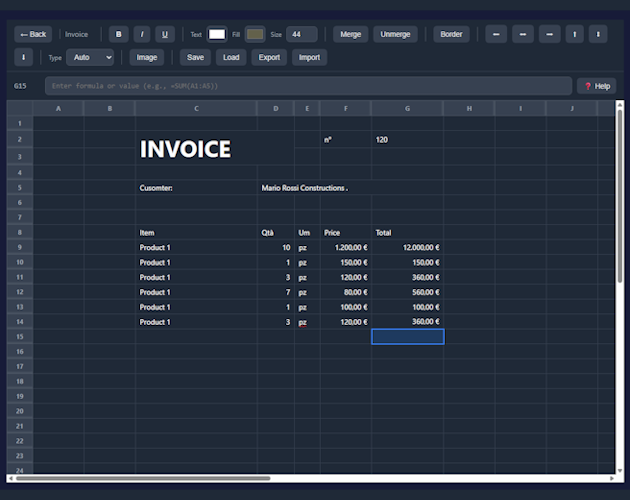
MRGridCell is a simple, beautiful spreadsheet application that helps you organize data, make calculations, and keep track of your numbers – all without the complexity of big office software!
🎯 Perfect for: Shopping lists, budgets, grade tracking, inventory, expense reports, and anything else you can put in a grid!
🏠 Home Screen
When you open MRGridCell, you'll see all your spreadsheets as cards:
- ➕ New Spreadsheet – Click the big blue button to create a fresh document
- ✏️ Rename – Click the pencil icon on any card
- 📋 Clone – Make a copy of an existing spreadsheet
- 🗑️ Delete – Remove spreadsheets you don't need anymore
- 🖱️ Open – Just click on any card to start editing!
📝 Working with Cells
Selecting Cells
- 🖱️ Click any cell to select it
- 🎯 Click and drag to select multiple cells
- ⬆️⬇️⬅️➡️ Use arrow keys to move around
Editing Cells
- Just start typing to enter data
- Or double-click a cell to edit its contents
- Press Enter to confirm and move down
- Press Tab to confirm and move right
- Press Escape to cancel your changes
🧮 Using Formulas
Want to do math? Start your cell with an = sign!
| Formula | What it does | Example |
|---|---|---|
| =SUM() | Adds up all the numbers | =SUM(A1:A10) |
| =AVERAGE() | Calculates the average | =AVERAGE(B1:B5) |
| =MAX() | Finds the biggest number | =MAX(C1:C20) |
| =MIN() | Finds the smallest number | =MIN(D1:D10) |
| Math | Basic calculations | =A1*B1+10 |
💡 Pro tip: You can also reference other cells directly, like =A1+B1!
🎨 Formatting Your Data
Right-click on any cell to open the formatting menu!
Text Styling
- B – Bold
- I – Italic
- U – Underline
S– Strikethrough
Alignment
- ⬅️ Left align
- ⬆️ Center align
- ➡️ Right align
Colors
- 🎨 Change text color
- 🖌️ Change background color
Number Formats
- 🔢 Number – Regular numbers
- 💵 Currency – Money formats (USD, EUR, GBP, and more!)
- 📊 Percentage – Show as percent
💱 Currency Options
MRGridCell supports multiple currencies:
- 🇺🇸 USD – US Dollar ($)
- 🇪🇺 EUR – Euro (€)
- 🇬🇧 GBP – British Pound (£)
- 🇯🇵 JPY – Japanese Yen (¥)
- 🇨🇭 CHF – Swiss Franc
- 🇨🇳 CNY – Chinese Yuan (¥)
📋 Copy & Paste Magic
- Ctrl+C – Copy selected cells (including formatting!)
- Ctrl+V – Paste cells
- Ctrl+X – Cut cells
✨ Smart feature: When you copy a formula, MRGridCell automatically adjusts
the cell references! For example, if you copy =A1+B1 from row 1 to row 2,
it becomes =A2+B2. Magic! 🪄
🔒 Lock references: Use $ to keep references fixed:
$A$1– Column AND row stay fixed$A1– Only column stays fixedA$1– Only row stays fixed
📏 Resizing Columns & Rows
- ↔️ Columns: Drag the right edge of any column header (A, B, C...)
- ↕️ Rows: Drag the bottom edge of any row number (1, 2, 3...)
Look for the blue highlight when you hover over the resize area!
🖼️ Adding Images
You can add images to your spreadsheet!
- Use the toolbar to add an image
- 🖱️ Drag to move it around
- 📐 Resize using the corner handles
- 🗑️ Press Delete to remove a selected image
⌨️ Keyboard Shortcuts
| Shortcut | Action |
|---|---|
| Ctrl+C | Copy |
| Ctrl+V | Paste |
| Ctrl+X | Cut |
| F2 | Edit current cell |
| Enter | Confirm & move down |
| Tab | Confirm & move right |
| Escape | Cancel editing |
| Delete | Clear cell / Delete image |
| Arrow Keys | Navigate cells |
❓ Need Help?
Click the ❓ Help button in the formula bar anytime to see a quick reference guide!
💾 Auto-Save
Don't worry about losing your work – MRGridCell automatically saves everything as you type! Your data is stored locally on your computer, so it's always there when you come back. 🎉
📊 MRGridCell
Simple spreadsheets, beautifully done. ✨
Made with 💖 by MisterMR
Development log
- 🎉 Introducing MRGridCell v1.0.0!Jan 24, 2026
Leave a comment
Log in with itch.io to leave a comment.