MRLOGO TURTLE (Prototype)
🐢 MR Logo Turtle
Interactive Turtle Graphics Programming Environment
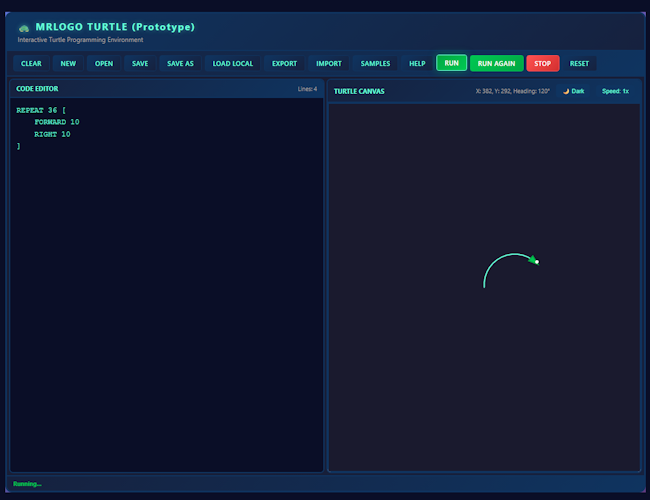
Create beautiful geometric art and learn programming through the classic Logo language. Control a turtle that draws on a canvas as you write code!
🎯 What is MR Logo Turtle?
MR Logo Turtle is a web-based interactive programming environment that brings the classic Logo turtle graphics to your browser. Write Logo commands, watch the turtle move and draw, and create stunning geometric patterns and art.
✨ Key Features
🎨 Interactive Graphics
Real-time visualization of your Logo programs with smooth turtle animation
📝 Full Logo Language
Complete implementation of Logo commands including movement, drawing, colors, loops, and procedures
💾 File Management
Save, load, export, and import your Logo programs. Auto-save to local storage
📚 Sample Programs
Built-in collection of example programs to learn from and experiment with
⚡ Speed Control
Adjustable animation speed - slow it down to learn or speed it up for quick results
🌙 Dark/Light Theme
Toggle between themes for comfortable coding in any lighting condition
🚀 Quick Start
- Open
index.htmlin your web browser - Type Logo commands in the code editor
- Click RUN to execute your program
- Watch the turtle draw on the canvas!
📖 Logo Commands
Movement & Drawing
FORWARD norFD n- Move forward n unitsBACK norBK n- Move backward n unitsRIGHT norRT n- Turn right n degreesLEFT norLT n- Turn left n degreesPENUPorPU- Lift pen (move without drawing)PENDOWNorPD- Lower pen (draw while moving)CIRCLE r- Draw a circle with radius r
Position & Control
HOME- Return to center and reset headingSETPOS [x y]- Move to coordinates (x, y)SETHEADING norSETH n- Set heading in degreesCLEARSCREENorCS- Clear canvas
Colors & Styling
SETPENCOLOR colororSETPC color- Set pen colorSETPENSIZE norSETPW n- Set pen widthSETFILLCOLOR colororSETFC color- Set fill color- Colors: BLACK, WHITE, RED, GREEN, BLUE, YELLOW, CYAN, MAGENTA, ORANGE, PURPLE, PINK, BROWN, GRAY, or hex codes
Programming
REPEAT n [commands]- Repeat commands n timesTO name [params] ... END- Define proceduresMAKE var valueorSET var value- Set variablesIF [condition] [commands]- Conditional executionPRINT valueorPR value- Print values
💡 Example Programs
Draw a Square
FORWARD 100
RIGHT 90
FORWARD 100
RIGHT 90
FORWARD 100
RIGHT 90
FORWARD 100
Draw a Star
REPEAT 5 [
  FORWARD 100
  RIGHT 144
]
🎓 Perfect For
- Learning Programming: Understand basic programming concepts through visual feedback
- Teaching: Great tool for educators teaching programming fundamentals
- Art Creation: Create geometric patterns and algorithmic art
- Experimentation: Try out Logo programming without installing anything
🛠️ Technical Details
Built with vanilla JavaScript, HTML5 Canvas, and CSS. No dependencies required - just open and run!
Browser Requirements: Modern browser with HTML5 Canvas and ES6 JavaScript support
🎉 Start Creating!
Download MR Logo Turtle and begin your journey into turtle graphics programming. No installation needed - just open the HTML file and start coding!
Development log
- 🐢 MR Logo Turtle - Release Announcement74 days ago
Leave a comment
Log in with itch.io to leave a comment.